Learn How to Make Fast Money by Learning diffrent Strategies in Forex Trading and Different Investment Options
Forex Order Types Explained: Complete Guide for Traders
The National Futures Association recommends that traders understand all available order types before trading with real money.
Understanding forex order types is fundamental to successful trading. The right order type at the right time means the difference between entering at your desired price or watching opportunities slip away, between protecting profits or giving them back to the market.
Many beginners stick to basic market orders, unaware that other order types offer greater control, better prices, and automated risk management. They manually watch charts for hours, missing entries when they step away, or holding losing positions because they didn’t set protective stops.
Professional traders use the full range of order types strategically. They enter positions at specific prices while away from their computers. They lock in profits automatically when targets are reached. They limit losses without emotional decision-making during volatile market swings.
This comprehensive guide explains every forex order type, when to use each one, and how to combine them for effective trade management. You’ll learn the mechanics of market orders, limit orders, stop orders, and advanced order combinations that automate your trading strategy.
Forex trading revolves around three fundamental order types that form the foundation of trade execution.
Market Orders
A market order executes immediately at the best available current price.
How It Works:
When you place a market order to buy EUR/USD, your broker finds the best available ask price at that moment and executes your trade instantly. Similarly, a market sell order executes at the current bid price.
Example:
EUR/USD shows a bid/ask of 1.1000/1.1002. You place a market order to buy. Your trade executes at 1.1002 (the ask price)—you “pay the spread” to enter immediately.
Advantages:
Guaranteed execution (order will fill)
Immediate entry—you’re in the market within milliseconds
Simple to execute—just click buy or sell
Best for liquid major pairs during normal market hours
Disadvantages:
No price control—you get whatever price is available
Slippage during volatile periods (execution price differs from displayed price)
Always pays the spread
Can result in poor fills during news releases or low liquidity
When to Use Market Orders:
When immediate execution is more important than exact price
In highly liquid markets (major pairs during London/NY sessions)
When the spread is tight (1-3 pips)
For quick scalping entries and exits
When you’re actively monitoring and want instant response
When to Avoid Market Orders:
During major news releases (spreads widen, slippage increases)
In exotic or less liquid pairs (unpredictable execution prices)
When exact entry price is critical to your trade setup
During Asian session low-liquidity periods
According to the National Futures Association, understanding order execution mechanics helps traders make better-informed trading decisions.
Limit Orders
A limit order executes only at a specific price or better.
How It Works:
A buy limit order sits below current price, waiting for price to drop to your specified level before executing. A sell limit order sits above current price, waiting for price to rise to your level.
Buy Limit Order Example:
EUR/USD trades at 1.1050. You believe it will pull back to 1.1020 before continuing higher. You place a buy limit order at 1.1020. If price drops to 1.1020, your order executes automatically. If price never reaches 1.1020, your order remains pending.
Sell Limit Order Example:
GBP/USD trades at 1.2700. You expect it to rally to 1.2750 resistance before reversing. You place a sell limit order at 1.2750. When price reaches 1.2750, your short position opens automatically.
Advantages:
Price control—you specify exact entry price
Can potentially get better fill than current market price
Works automatically—no need to watch charts constantly
Avoids paying wider spreads from market orders
Lets you “buy the dip” or “sell the rally” systematically
Disadvantages:
No execution guarantee—price might never reach your level
Partial fills possible if liquidity is thin at your price
Requires accurate price prediction
Opportunity cost if price moves away without touching your level
When to Use Limit Orders:
Entering on pullbacks within established trends
Buying support or selling resistance levels
When you have time to wait for optimal entry
During ranging markets bouncing between levels
To avoid chasing price during strong momentum
When to Avoid Limit Orders:
In rapidly moving markets where price might not retrace
When immediate entry is required for your strategy
During breakouts (price rarely comes back after breaking out)
If you need guaranteed execution
Stop Orders
A stop order becomes a market order once price reaches a specified trigger level.
How It Works:
A buy stop order sits above current price—when price rises to your trigger, it executes a buy. A sell stop order sits below current price—when price falls to your trigger, it executes a sell.
Buy Stop Order Example:
USD/JPY consolidates at 144.50-145.00. You want to buy a breakout above 145.00. You place a buy stop at 145.10 (slightly above resistance to confirm the break). When price hits 145.10, your buy order triggers as a market order.
Sell Stop Order Example:
AUD/USD ranges between 0.6500-0.6600. You want to short a breakdown below support. You place a sell stop at 0.6490 (slightly below 0.6500). When price hits 0.6490, your short position opens.
Advantages:
Automates breakout trading
Confirms momentum before entry
Prevents missing strong moves
Requires no manual intervention once set
Disadvantages:
Executes as market order (potential slippage)
Can trigger on false breakouts
Often results in worse entry price than limit orders
Whipsaw risk (triggered then price reverses)
When to Use Stop Orders:
Trading breakouts from consolidation
Entering when price confirms trend continuation
Building positions as trends strengthen
Triggering entries on momentum confirmation
When to Avoid Stop Orders:
In choppy, ranging markets (high false breakout risk)
During news events (wide slippage common)
When precise entry price is critical
In illiquid markets or exotic pairs
Protective Stop Orders
Stop orders also serve as risk management tools to limit losses and protect profits.
Stop-Loss Orders
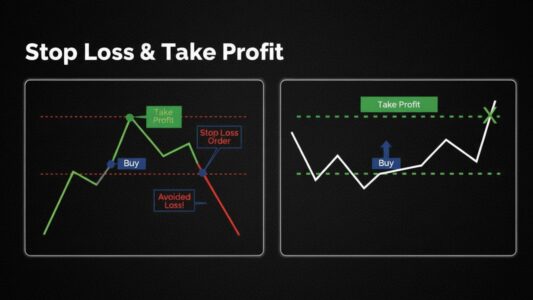
A stop-loss order automatically closes a position when price moves against you by a specified amount, limiting your loss.
How It Works:
After entering a buy position, you place a sell stop-loss below your entry. If price drops to this level, the stop-loss triggers and closes your position automatically. For short positions, a buy stop-loss sits above entry.
Example:
You buy EUR/USD at 1.1100 with a 50-pip stop-loss at 1.1050. If price drops to 1.1050, your position closes automatically with a 50-pip loss. If price never hits 1.1050, the stop-loss remains in place until you cancel it or the position closes at profit.
Why Stop-Losses Are Essential:
Without stop-losses, small manageable losses become account-destroying catastrophes. A trade that should lose 30 pips can lose 300 pips if you hold hoping it will reverse. Stop-losses enforce discipline and protect capital.
Stop-Loss Placement Strategies:
Technical Placement: Set stops beyond key technical levels—below support for longs, above resistance for shorts. This placement gives your trade room to breathe while protecting against true reversal.
Example: Buy at support (1.1000), place stop 20 pips below (1.0980) to allow for normal volatility.
Percentage-Based: Calculate stop distance based on your risk tolerance (typically 1-2% of account). This ensures consistent risk across all trades regardless of timeframe or pair.
Example: $10,000 account, 1% risk = $100 maximum loss. If pip value is $10, use 10-pip stop. If pip value is $5, use 20-pip stop.
ATR-Based: Use Average True Range (ATR) indicator to set stops based on pair’s normal volatility. Multiply ATR by 1.5-2 for stop distance.
Example: EUR/USD 4-hour ATR = 40 pips. Set stop at 60-80 pips (1.5-2× ATR) to avoid getting stopped by normal volatility.
The Financial Conduct Authority also notes that understanding order types and execution mechanics is important for retail traders.
Trailing Stop-Loss Orders
A trailing stop moves with price in your favor but never moves backward, protecting growing profits while allowing room for continuation.
How It Works:
You set a trailing distance (e.g., 50 pips). As price moves in your favor, the stop moves up (for longs) or down (for shorts) by the same amount, always maintaining the 50-pip distance. If price reverses and hits the trailing stop, the position closes.
Example:
Buy EUR/USD at 1.1000 with a 50-pip trailing stop (initially at 1.0950). Price rallies to 1.1050—your trailing stop moves up to 1.1000 (your breakeven point). Price continues to 1.1100—your stop moves to 1.1050, locking in 50 pips profit. If price reverses to 1.1050, your position closes automatically with 50 pips profit secured.
Advantages:
Automatically locks in profits as trends extend
Removes emotion from profit-taking decisions
Captures large moves without manual intervention
Protects profits while allowing winners to run
Disadvantages:
Can exit positions prematurely during normal pullbacks
Fixed trailing distance may not suit all market conditions
Requires careful distance calibration to avoid being too tight or too loose
Best Practices:
Set trailing distance based on ATR (1.5-2× ATR typically works well)
Use trailing stops only in trending markets, not ranges
Avoid activating trailing stops immediately—wait for initial profit first
Consider wider trailing distances for longer timeframes
Advanced Order Types
These sophisticated orders combine basic types for more complex trading strategies.
OCO Orders (One-Cancels-Other)
An OCO order links two orders together—when one executes, the other cancels automatically.
Common Use:
Setting both take-profit and stop-loss simultaneously. When one triggers (either profit target or stop-loss), the other cancels.
Example:
Buy EUR/USD at 1.1000. Set OCO order with:
Take-profit at 1.1100 (+100 pips)
Stop-loss at 1.0950 (-50 pips)
If price hits 1.1100, your profit target fills and the 1.0950 stop-loss cancels automatically. If price hits 1.0950 first, your stop-loss executes and the 1.1100 target cancels.
Advantages:
Complete trade automation
No need to manually cancel unfilled order
Prevents confusion from multiple open orders
Ensures only one outcome occurs
If-Done Orders
An if-done order consists of a primary order and a secondary order that only activates if the primary order fills.
Example:
Primary Order: Buy limit EUR/USD at 1.1000 (current price 1.1050)
If-Done Orders:
Stop-loss at 1.0950 (-50 pips)
Take-profit at 1.1100 (+100 pips)
The stop-loss and take-profit orders don’t activate until the buy limit at 1.1000 fills. This prevents orphaned protective orders if your entry order never executes.
Advantages:
Fully automates entry and exit
Prevents protective orders from existing without a position
Ideal for trading while away from computer
Reduces manual order management
Guaranteed Stop-Loss Orders
Some brokers offer guaranteed stops that promise execution at your exact stop price regardless of slippage or gap.
How It Works:
You pay a wider spread or a small fee per trade. In exchange, the broker guarantees your stop will fill at your specified price even during extreme volatility or weekend gaps.
When Valuable:
Holding positions through major news events
Trading during geopolitical uncertainty
Holding positions over weekends when gap risk exists
Trading highly volatile exotic pairs
Cost Consideration:
Guaranteed stops typically cost 1-3 additional pips in spread or a flat fee per trade. Evaluate whether this cost is worthwhile based on your trading style and risk tolerance.
Order Type Strategy by Trading Style
Different trading styles benefit from different order types.
Scalping
Primary Orders: Market orders for entries and exits
Why: Scalping requires immediate execution. Waiting for limit orders to fill wastes opportunities. Speed matters more than a few pips.
Stop Management: Use mental stops or very tight stop-losses (5-10 pips). Many scalpers exit manually rather than relying on orders due to the speed of scalping trades.
Take-Profits: Often manual exit at target rather than automated, allowing flexibility to exit earlier if momentum fades.
Day Trading
Entries: Mix of market orders (for immediate momentum plays) and limit orders (for pullback entries)
Stops: Always use stop-loss orders placed immediately when entering. Day traders can’t watch positions every second.
Profits: Use OCO orders combining take-profit targets with stop-losses for set-and-forget management during work hours.
Swing Trading
Entries: Primarily limit orders to enter at specific support/resistance levels
Stops: Stop-loss orders placed at technically significant levels (below swing lows for longs, above swing highs for shorts)
Profits: Combination of take-profit orders at resistance/support levels and trailing stops to capture extended moves
Position Trading
Entries: Limit orders for optimal entry prices (position traders have time to wait)
Stops: Wider stop-losses based on weekly/monthly chart structure
Profits: Trailing stops with wide distances (100-300 pips) to ride major trends, or take-profit orders at major technical levels
Common Order Type Mistakes
Avoid these errors that undermine effective order management.
Mistake 1: Not Using Stop-Losses
The Error: Entering trades without stops because “I’ll just watch it and exit manually if it goes wrong.”
Why It’s Wrong: Emotional decision-making during losses is unreliable. You’ll hold losing positions hoping for reversal, turning small losses into large ones.
The Solution: Always place stop-loss orders immediately when entering trades. Make this non-negotiable.
Mistake 2: Moving Stops Further Away
The Error: When price approaches your stop-loss, moving it further away to “give the trade more room.”
Why It’s Wrong: This turns a controlled small loss into an uncontrolled large loss. If your original stop placement was wrong, exit and re-enter with a better setup later.
The Solution: Never move stops away from entry. You can move them closer (or to breakeven) to protect profits, but never wider to avoid losses.
Mistake 3: Setting Unrealistic Limit Orders
The Error: Placing buy limit orders far below current price hoping to catch a flash crash, or sell limits far above hoping to catch a spike.
Why It’s Wrong: These orders rarely fill. When they do, it’s usually during crisis conditions where you don’t actually want to be entering.
The Solution: Place limit orders at realistic technical levels (support, resistance, Fibonacci levels) where price has reasonable probability of reaching in normal conditions.
Mistake 4: Using Stop Orders in Choppy Markets
The Error: Setting buy stops above resistance in a ranging, choppy market that keeps generating false breakouts.
Why It’s Wrong: You’ll get triggered on false breaks, then stopped out when price whipsaws back into the range. Multiple whipsaw losses drain accounts.
The Solution: Use stop orders only in clearly trending markets or after prolonged consolidation. In choppy conditions, use limit orders or wait for clearer conditions.
Mistake 5: Ignoring Spread When Placing Orders
The Error: Placing a buy limit at 1.1000 when the spread is 3 pips, forgetting you’ll actually pay 1.1003 on execution.
Why It’s Wrong: Your calculated risk-reward is off. You thought you were risking 50 pips but actually risked 53 pips due to spread.
The Solution: Factor spread into all limit and stop order calculations. For buy orders, add the spread to your intended price. For sells, subtract it.
Combining Order Types for Complete Trade Management
Professional traders use multiple order types together for fully automated trading strategies.
Complete Trade Setup Example
Setup: Trend-following EUR/USD long trade
Current Price: 1.1050
Analysis: Price is in uptrend, pulling back to 50 EMA support at 1.1000. Expect bounce and continuation to 1.1150 resistance.
Order Combination:
Buy Limit Order at 1.1000: Entry when price reaches support
If-Done Stop-Loss at 1.0950: Activates only if buy limit fills. Placed 50 pips below entry, below recent swing low.
If-Done Take-Profit at 1.1150: Activates only if buy limit fills. Placed at resistance level (+150 pips).
Alternative: OCO for exits once entered—take-profit at 1.1150, stop-loss at 1.0950. Whichever hits first, the other cancels.
Result: Completely automated trade. You can leave your computer, and the trade will enter at 1.1000 (if price gets there), automatically protect with stop-loss at 1.0950, and take profit at 1.1150. No manual intervention required.
Mastering forex order types transforms your trading from manual, stressful chart-watching to systematic, automated execution. Market orders provide immediate entry, limit orders give price control, and stop orders automate both entries and protective exits.
The key is using the right order type for each situation. Use market orders when immediate execution matters more than exact price. Use limit orders when you can wait for optimal entry prices at support or resistance. Use stop orders to automate breakout entries and protect positions with stop-losses.
Advanced traders combine these basic orders into sophisticated strategies using OCO and if-done orders for complete trade automation. This removes emotional decision-making, ensures consistent execution, and allows trading even when you can’t monitor markets constantly.
Start simple—master basic market orders, limit orders, and stop-loss protection. As you gain experience, gradually incorporate advanced order combinations that automate your entire trading process from entry through exit. Your trading results will improve as order management becomes systematic rather than reactive.