Learn How to Make Fast Money by Learning diffrent Strategies in Forex Trading and Different Investment Options
Cryptocurrency Wallets Guide: How to Secure Your Crypto
Cryptocurrency wallets function as digital keychains protecting access to your blockchain-stored assets rather than storing coins themselves. Unlike traditional bank accounts where institutions control your money, cryptocurrency wallets give you complete ownership and responsibility—meaning proper wallet security determines whether you maintain access to potentially life-changing wealth or lose everything to hackers, scams, or simple mistakes.
The cryptocurrency industry has witnessed billions in losses from wallet compromises: exchange hacks, phishing attacks stealing private keys, investors losing seed phrases, and malware draining hot wallets. Meanwhile, those understanding wallet security principles have protected their holdings through market volatility and built generational wealth.
This comprehensive cryptocurrency wallets guide explains everything you need to secure cryptocurrency properly: how cryptocurrency wallets actually work, critical differences between wallet types, choosing appropriate cryptocurrency wallets for your situation, setting up hardware wallets correctly, avoiding devastating security mistakes, and recovering access if something goes wrong.
Whether you’re buying your first Bitcoin or managing a six-figure cryptocurrency portfolio, understanding cryptocurrency wallets separates those who maintain control of their wealth from those who lose it permanently.
What Are Cryptocurrency Wallets and How Do They Work?
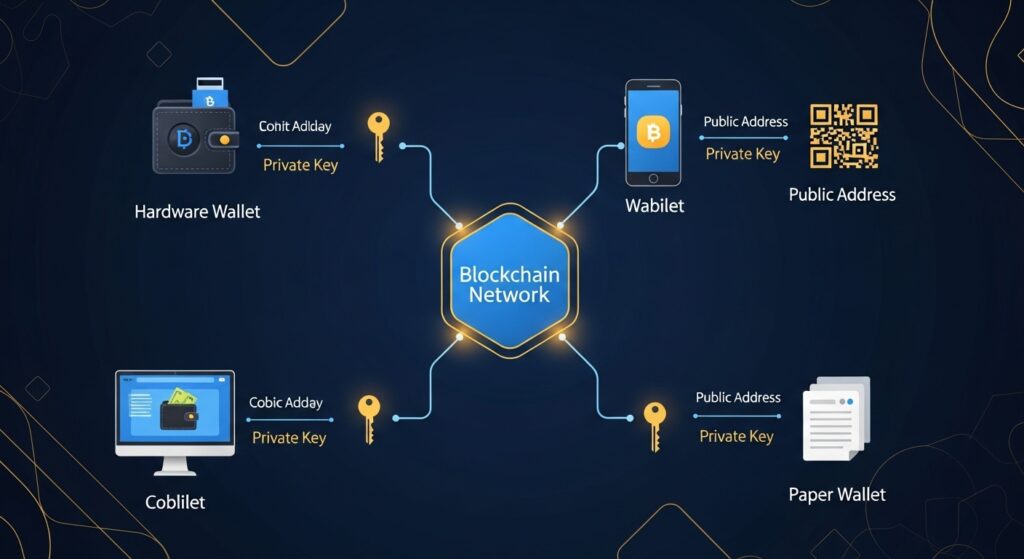
Cryptocurrency wallets don’t actually store your Bitcoin, Ethereum, or other digital assets. Your cryptocurrency exists on blockchain networks, permanently recorded in distributed ledgers accessible to anyone. Wallets store the cryptographic keys proving ownership and enabling transactions.
Understanding Private and Public Keys
Public Key (Public Address): Your public address functions like a bank account number—shareable with anyone who needs to send you cryptocurrency. Public addresses appear as long strings of letters and numbers:
You can share public addresses freely without security risk. Think of them as your cryptocurrency receiving address.
Private Key: Your private key functions as the password proving ownership of cryptocurrency at a specific address. Private keys enable spending, transferring, or accessing your holdings. They appear as:
Long strings of numbers and letters
12-24 word seed phrases (human-readable private key backups)
QR codes (encoded private keys)
Critical Understanding: Anyone controlling private keys controls the cryptocurrency. Lose private keys, lose access forever. Share private keys, lose your crypto permanently to whoever obtains them.
How Wallet Transactions Work
Sending Cryptocurrency:
You initiate transaction in wallet software
Wallet uses your private key to digitally sign transaction
Signed transaction broadcasts to blockchain network
Network miners/validators verify signature matches public address
Transaction confirms and recipient receives cryptocurrency
Receiving Cryptocurrency:
Share your public address with sender
Sender initiates transaction to your address
Blockchain records transaction
Your wallet detects incoming transaction
Balance updates automatically
Your wallet constantly scans blockchain for transactions involving your public addresses and displays current balances.
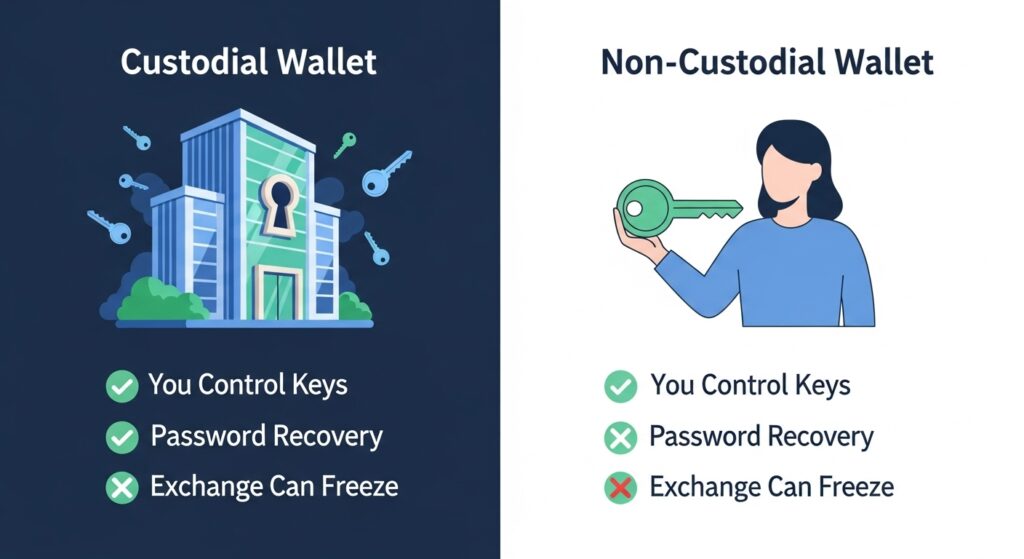
Custodial vs Non-Custodial Wallets
Custodial Wallets (Third-Party Control):
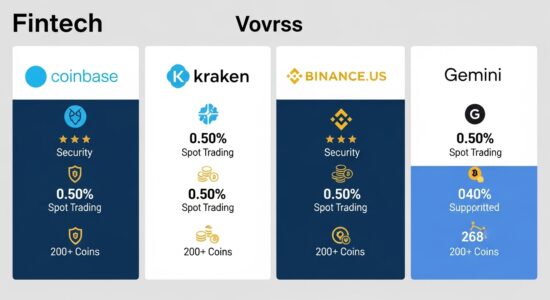
Exchanges like Coinbase, Binance, and Kraken hold your private keys. You access cryptocurrency through their platforms using username/password like traditional banking.
Advantages:
Familiar user experience
Password recovery available
Customer support
Convenient for trading
Disadvantages:
You don’t control private keys
Exchange can freeze your account
Exchange hacks affect you
Counterparty risk
Government seizure possible
Non-Custodial Wallets (Self-Custody):
You control private keys completely. No third party can access, freeze, or seize your cryptocurrency.
Advantages:
Complete ownership and control
No counterparty risk
Immune to exchange failures
True financial sovereignty
Privacy advantages
Disadvantages:
Complete responsibility for security
No password recovery
You must secure backups
Higher learning curve
Fundamental Principle: “Not your keys, not your coins.” If you don’t control private keys, you don’t truly own your cryptocurrency—you hold an IOU from the exchange.
Types of Cryptocurrency Wallets
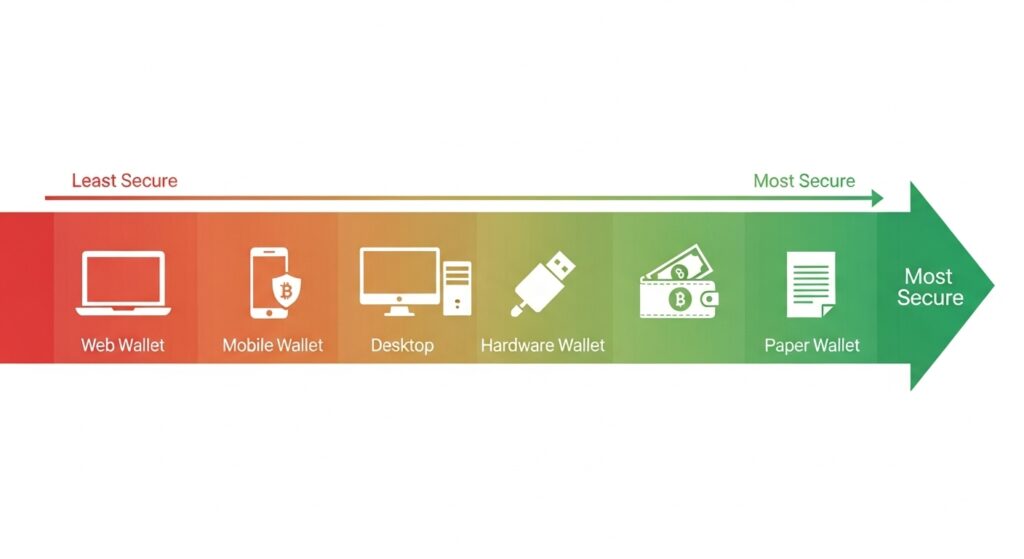
Wallets exist on a security-convenience spectrum. More secure wallets sacrifice convenience; more convenient wallets sacrifice security.
Hot Wallets (Internet-Connected)
Hot wallets maintain constant or frequent internet connectivity, prioritizing convenience over maximum security.
Mobile Wallets: Smartphone apps storing private keys on your device.
Popular Options:
Trust Wallet (multi-currency, user-friendly)
MetaMask (Ethereum and EVM chains)
Exodus (beautiful interface, multi-currency)
Coinbase Wallet (non-custodial despite name)
Advantages:
Convenient for daily transactions
QR code scanning for payments
DeFi access on mobile
Free
Suitable for moderate amounts
Disadvantages:
Vulnerable to phone theft/loss
Malware risk if device compromised
Online exposure creates attack surface
Lost phone can mean lost crypto without backups
Best Use: Daily spending amounts ($100-2,000), DeFi interactions, payments. Never store entire portfolio.
Desktop Wallets: Software installed on computers storing private keys on hard drive.
Popular Options:
Electrum (Bitcoin-only, advanced features)
Exodus (multi-currency desktop version)
Atomic Wallet (multi-currency with built-in exchange)
Advantages:
More features than mobile wallets
Larger screens for complex transactions
Free
Disadvantages:
Computer malware risk
Online when connected to internet
Hard drive failure can cause loss
Less convenient than mobile
Best Use: Intermediate holdings ($500-5,000), users preferring desktop over mobile, testing new cryptocurrencies.
Web Wallets: Browser-based wallets accessed through websites.
Advantages:
Access from any device
No software installation
Convenient for quick transactions
Disadvantages:
Highest phishing risk
Dependent on website security
May not control private keys
Best Use: Minimal amounts for testing purposes only. Avoid for serious holdings.
Cold Wallets (Offline Storage)
Cold wallets store private keys completely offline, providing maximum security against digital threats.
Hardware Wallets: Physical devices like Ledger or Trezor that store private keys offline.
Popular Options:
Ledger Nano X ($149): Bluetooth enabled, supports 5,500+ coins
Ledger Nano S Plus ($79): USB-only, supports 5,500+ coins
Trezor Model T ($219): Touchscreen, open-source firmware
Trezor One ($69): Button interface, open-source
Advantages:
Maximum security for digital assets
Immune to online hacks
Support multiple cryptocurrencies
Relatively easy to use
Protected by PIN codes
Generate transactions offline
Disadvantages:
Cost $70-220
Less convenient than hot wallets
Can be damaged or lost (recoverable with seed phrase)
Learning curve for setup
Physical theft possible (PIN protected)
Best Use: Long-term holdings, significant amounts ($1,000+), retirement investments, majority of serious investor portfolios.
Paper Wallets: Private keys printed on physical paper.
Advantages:
Completely offline
Free to create
Immune to digital hacks
Disadvantages:
Physical damage/degradation risk
Fire, water, wear concerns
Easy to lose
Difficult to use for transactions
Outdated method
Best Use: Generally not recommended—hardware wallets are superior in every practical way.
Choosing the Right Wallet for Your Needs
Match wallet type to your cryptocurrency usage and holdings.
Active Day Trader:
Primary: Exchange wallet for immediate trading access
Secondary: Hardware wallet for profits and long-term holdings
Never keep more than 5-10% of total portfolio on exchange
Regular Buyer (Dollar-Cost Averaging):
Purchase on exchange
Transfer to hardware wallet monthly
Accumulate on exchange between transfers to minimize fees
Recommended: Ledger Nano S Plus or Trezor One
Long-Term Investor (HODL Strategy):
Purchase on exchange
Transfer immediately to hardware wallet
Store securely and don’t touch until selling
Recommended: Ledger Nano X or Trezor Model T for maximum features
DeFi User:
Mobile wallet (MetaMask, Trust Wallet) for DeFi protocol interactions
Hardware wallet for bulk of holdings
Transfer small amounts to mobile wallet as needed for DeFi
Warning: DeFi involves smart contract risk; never connect hardware wallet directly to unknown protocols
Casual User (Small Amounts):
Mobile wallet like Trust Wallet or Coinbase Wallet
Acceptable for amounts under $500
Ensure proper seed phrase backups
Upgrade to hardware wallet when holdings exceed $1,000
Portfolio Allocation Strategy
For Holdings Under $1,000:
Mobile wallet: 100%
For Holdings $1,000-10,000:
Hardware wallet: 80%
Mobile wallet: 20%
For Holdings $10,000-100,000:
Hardware wallet #1: 60%
Hardware wallet #2: 30% (different location)
Mobile wallet: 10%
For Holdings $100,000+:
Hardware wallet #1: 40%
Hardware wallet #2: 30%
Hardware wallet #3: 20%
Mobile/exchange: 10%
Consider multi-signature setup
Setting Up a Hardware Wallet (Step-by-Step)
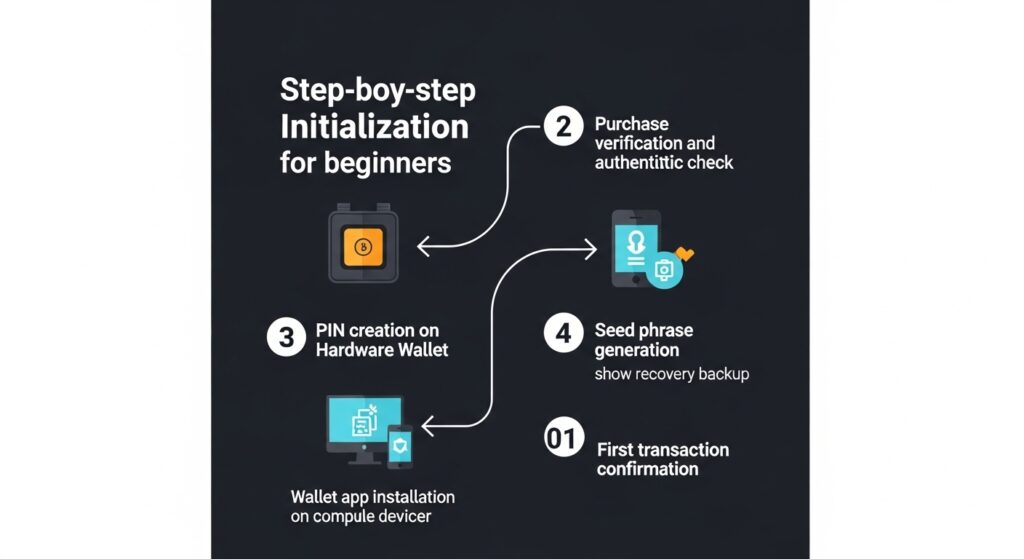
Hardware wallets provide best security for serious holdings. Here’s the complete setup process using Ledger as example (Trezor similar).
Step 1: Purchase from Official Source
CRITICAL: Only buy hardware wallets from official manufacturers.
Legitimate Sources:
Ledger.com (official website)
Trezor.io (official website)
Authorized retailers listed on manufacturer websites
NEVER Buy From:
Amazon (risk of tampering)
eBay (high counterfeit risk)
Third-party resellers
“Too good to be true” discounts
Verify Package:
Sealed packaging
No signs of tampering
Includes all advertised components
Serial numbers match (if applicable)
If anything seems suspicious, contact manufacturer immediately before setup.
Step 2: Initialize Device
Unbox and Connect:
Remove device from package
Connect to computer via USB
Download Ledger Live or Trezor Suite software from official website
Install and launch software
Create New Wallet:
Select “Set up as new device”
Create PIN code (4-8 digits)
Choose strong PIN (not 0000 or 1234)
Confirm PIN by re-entering
Critical: Device will now generate your 24-word recovery seed phrase.
Step 3: Backup Recovery Seed Phrase
The Most Critical Step:
Your device will display 24 random words. These words ARE your cryptocurrency. Anyone with these words controls your crypto.
Backup Process:
Write each word in exact order on provided recovery card
Double-check spelling of every word
Verify order is correct (word #1, word #2, etc.)
Never photograph or type seed phrase digitally
Device will quiz you on random words to confirm proper backup
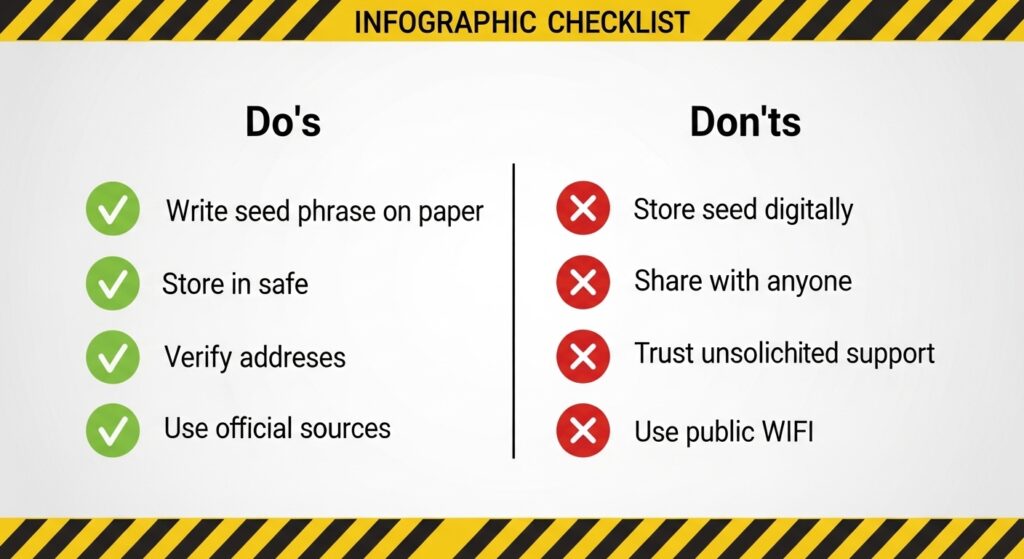
Seed Phrase Security:
Store in fireproof safe
Never save digitally (no photos, no computer files, no cloud)
Never share with anyone (including “support” claiming to need it)
Consider metal backup for fire/water protection (Cryptosteel, Billfodl)
Store in separate location from hardware wallet
Consider multiple copies in different locations
If you lose seed phrase AND lose device, your cryptocurrency is gone forever. No recovery possible.
Step 4: Install Cryptocurrency Wallets Apps
Hardware cryptocurrency wallets require installing specific apps for each cryptocurrency type.
In Ledger Live or Trezor Suite:
Navigate to “Manager” section
Search for cryptocurrency (Bitcoin, Ethereum, etc.)
Click “Install” next to each cryptocurrency you own
Apps install to device (takes 30-60 seconds each)
You can install/uninstall apps anytime without affecting holdings.
Step 5: Create Accounts and Receive Cryptocurrency
Generate Receiving Addresses:
Open Bitcoin app on device (or your cryptocurrency of choice)
In software, click “Receive”
Verify address on device screen matches software
Always verify on device screen (protects against malware)
Copy address or use QR code
First Test Transaction:
Send small amount from exchange to hardware wallet address ($20-50)
Wait for confirmation (Bitcoin: 30-60 minutes, Ethereum: 2-5 minutes)
Verify receipt in wallet software
After successful test, send larger amounts
Step 6: Send Cryptocurrency
When Spending from Hardware Wallet:
Open cryptocurrency app on device
In software, click “Send”
Enter recipient address and amount
Review transaction details carefully
Physically confirm on device by pressing buttons
Transaction signs and broadcasts
Critical: Transaction ONLY processes when physically confirmed on device. This protects against malware attempting to change transaction details.
Critical Wallet Security Practices
These practices protect your cryptocurrency from loss, theft, and scams.
Seed Phrase Security (Most Important)
Your 12-24 word seed phrase is your cryptocurrency. Protect it above everything else.
Never:
Photograph seed phrase
Save seed phrase in computer file
Store seed phrase in email
Save in cloud storage (Google Drive, Dropbox, iCloud)
Share with anyone claiming to be “support”
Enter seed phrase into websites
Store with cryptocurrency exchange login information
Always:
Write on paper or metal backup
Store in fireproof safe or safety deposit box
Keep separate from hardware wallet
Create multiple copies in separate locations
Tell trusted family member where backup is stored (for inheritance)
Consider split storage (first 12 words in one location, last 12 in another)
Advanced Protection: Consider engraving seed phrases on metal plates resistant to fire, water, and corrosion:
Cryptosteel Capsule ($80-100)
Billfodl ($80)
Blockplate ($40-50)
These survive house fires (up to 1400°F/760°C), floods, and physical damage that destroys paper.
Protecting Against Phishing and Scams
Common Cryptocurrency Scams:
Fake Support Messages:
Scam: Someone claiming to be Ledger/Trezor support contacts you asking for seed phrase
Reality: Official support NEVER asks for seed phrases
Protection: Ignore all unsolicited “support” messages; initiate contact yourself through official channels
Phishing Websites:
Scam: Fake websites mimicking exchanges or wallet providers
Reality: Designed to steal login credentials or seed phrases
Verify transaction confirmed on block explorer (blockchain.com for Bitcoin, etherscan.io for Ethereum)
Check derivation path settings (advanced)
Transaction Stuck/Pending:
Bitcoin:
Check mempool.space for confirmation status
Low fee means longer wait (possibly days during congestion)
Can use Replace-By-Fee (RBF) to increase fee if wallet supports it
Ethereum:
Check etherscan.io for transaction status
Low gas price means longer wait
Can send replacement transaction with higher gas and same nonce (advanced)
Can’t Send Transaction:
Insufficient balance for amount + fees
Device not unlocked or app not opened
Network congestion (try increasing fee)
Wallet software out of date
Inheritance Planning
Cryptocurrency Requires Special Planning:
Traditional inheritance doesn’t work with cryptocurrency because:
No institution holds your assets
Seed phrase needed to access
Failure to pass seed phrase means permanent loss
Recommended Approach:
Option 1: Direct Inheritance Instructions
Create sealed envelope with seed phrase
Include clear instructions on recovery process
List what cryptocurrencies and approximate amounts
Store with will/trust documents
Tell trusted family member or attorney envelope exists
Option 2: Multi-Signature Setup
Create 2-of-3 multisig wallet
You hold one key, trusted family member holds second, attorney holds third
Any two keys can access funds
Provides backup even if you become incapacitated
Option 3: Dead Man’s Switch
Services like Casa provide time-lock inheritance
Requires periodic check-ins
If you don’t check in, trusted contacts receive access
Critical: Don’t die with seed phrase as only copy. Plan cryptocurrency inheritance explicitly or heirs lose everything.
Advanced Cryptocurrency Wallets Features
Multi-Signature Wallets
What it is : Cryptocurrency wallets requiring multiple private keys to authorize transactions (e.g., 2-of-3, 3-of-5).
Use Cases:
Business accounts requiring multiple approvals
Joint accounts between partners
Enhanced security (attacker needs multiple keys)
Inheritance planning
Popular Platforms:
Gnosis Safe (Ethereum)
Electrum (Bitcoin)
Casa (Bitcoin with inheritance features)
Trade-offs:
More complex setup
Higher transaction fees
Requires coordination between key holders
Hierarchical Deterministic Wallets (HD Wallets)
What It Means: Modern wallets generate unlimited addresses from single seed phrase using mathematical derivation.
Advantages:
Use new address for each transaction (privacy)
One backup protects unlimited addresses
Can generate receiving addresses without private key (advanced)
All modern wallets (Ledger, Trezor, MetaMask, Trust Wallet) are HD wallets.
Watch-Only Wallets
What It Is: Wallet monitoring balances and transactions without ability to spend.
Use Cases:
Portfolio tracking without exposure
Monitoring cold storage balances
Sharing balance visibility without spending access
Popular Tools:
Delta (portfolio tracker)
Blockfolio (portfolio tracker)
Watch-only mode in Electrum
Passphrase Protection (25th Word)
What It Is: Optional extra word added to 24-word seed phrase creating entirely different wallet.
Advantages:
Plausible deniability (show “decoy” wallet under duress)
Additional layer of protection
Compromised seed phrase alone insufficient
Disadvantages:
Forget passphrase = lost funds
More complexity
Easy to misconfigure
When to Use:
Very large holdings
High-security requirements
Concerns about physical coercion
Cryptocurrency wallets represent the foundation of digital asset security, determining whether you maintain sovereign control over potentially life-changing wealth or lose everything to preventable mistakes. Unlike traditional finance where institutions provide safety nets, cryptocurrency wallets operate on principle of complete personal responsibility—making wallet security knowledge absolutely essential.
The overwhelming majority of cryptocurrency losses result not from sophisticated attacks but from fundamental mistakes: keeping everything on exchanges that get hacked or go bankrupt, failing to back up seed phrases properly, falling for obvious support scams, or storing recovery phrases in easily compromised digital formats. Meanwhile, those following basic security principles—hardware wallets for significant holdings, proper seed phrase backups, verified addresses before sending—protect their wealth through market volatility and build generational wealth.
Start with mobile wallet for small amounts while learning, upgrade to hardware wallet when holdings exceed $1,000, create proper seed phrase backups stored in fireproof locations immediately, and never share seed phrases with anyone regardless of claimed reason. Your cryptocurrency security depends entirely on your understanding and implementation of these principles—no institution, insurance, or customer support can recover cryptocurrency lost through security failures.
Ready to Secure Your Cryptocurrency?
Begin by purchasing a hardware wallet from official sources: Ledger.com for Ledger Nano devices or Trezor.io for Trezor hardware wallets. Start with Ledger Nano S Plus ($79) or Trezor One ($69) for beginners, upgrading to Ledger Nano X or Trezor Model T for advanced features. Follow the setup process carefully, create proper seed phrase backups before transferring significant amounts, and test recovery with small amounts first. Review our cryptocurrency trading guide, Bitcoin guide, Ethereum guide, and best cryptocurrency exchanges comparison for comprehensive crypto education.