Learn How to Make Fast Money by Learning diffrent Strategies in Forex Trading and Different Investment Options
Optimizing Expert Advisor Settings for Maximum Profit
Optimizing Expert Advisor settings can dramatically improve performance, transforming mediocre systems into profitable strategies. However, optimizing Expert Advisor settings also introduces significant risks—over-optimized EAs produce spectacular backtest results that collapse in live trading through a phenomenon called curve-fitting.
Learning to optimize effectively while avoiding over-optimization separates profitable automated traders from those who chase perfect backtests that never translate to real profits. This guide on optimizing Expert Advisor settings teaches you proper optimization methodology, how to use MT4 and MT5 optimization tools, identifying robust versus fragile parameters, and validating optimization results to ensure they work beyond historical data.
You’ll understand which parameters to optimize, which to leave alone, how to interpret optimization results critically, and how to test optimized settings rigorously before risking real capital.
Optimizing expert advisor settings means finding parameter values that improve performance without fitting the EA too closely to historical data.
The line between helpful optimization and destructive over-optimization determines EA success or failure.
What Optimization Should Achieve
Proper optimization finds parameter values that align EA behavior with market characteristics while maintaining robust performance across varying conditions. You’re seeking parameter ranges that work well, not single perfect values that work amazingly under specific historical circumstances.
Good optimization identifies that “moving average periods between 15-25 perform similarly well” rather than “period 19 is the magic number.”
What Over-Optimization Creates
Over-optimization, also called curve-fitting, adjusts parameters until the EA perfectly fits historical price movements. The result looks spectacular in backtests but fails immediately in live trading because markets never repeat exactly.
Curve-fitted EAs essentially memorize historical data rather than learning genuine market patterns. When future data differs even slightly from the historical period, performance collapses.
Warning Signs of Over-Optimization
Recognize these red flags indicating curve-fitting rather than genuine optimization:
Performance extremely sensitive to small parameter changes (period 19 works great, 18 and 20 fail)
Optimization produces narrow “islands” of profitability in parameter space
Optimized parameters are odd, specific numbers (19.37 rather than round values like 20)
Performance on optimization period excellent but validation period terrible
Equity curve unrealistically smooth with minimal drawdown
For understanding proper backtesting methodology that prevents misleading optimization, see our backtesting guide.
Which Parameters to Optimize
Not all inputs are worth adjusting — optimizing expert advisor settings works best when focused on the parameters that most directly affect entry and exit logic
When optimizing Expert Advisor settings, not all EA parameters benefit from adjustment..
Parameters Worth Optimizing
Indicator Periods Moving average lengths, RSI periods, MACD settings—these define how your EA interprets market data. Optimization can align these with the rhythm of the market you’re trading.
Optimize ranges rather than seeking exact values. If testing MA periods from 10-30, look for ranges producing consistent results (15-25 all work well) rather than single optimal values.
Entry Thresholds RSI overbought/oversold levels, breakout buffer distances, volatility filters—these determine when trades trigger. Markets vary in typical ranges, making these reasonable optimization candidates.
Take Profit and Stop Loss Distances Within reason, these can be optimized to match typical market movement ranges for your trading timeframe. However, don’t optimize them to the point where results depend entirely on these values.
Time Filters If your strategy trades specific sessions, optimize exact start/end times. Different markets have different active hours, and optimization can fine-tune these.
Parameters to Avoid Optimizing
Position Size/Lot Size This is risk management, not strategy. Set based on your risk tolerance, not optimization results. Optimization might suggest 5.0 lots produce the best returns—but this just means taking enormous risk.
Magic Number This identifier distinguishes your EA’s orders from others. It’s arbitrary and meaningless for optimization.
Slippage Tolerance Set based on broker characteristics, not optimized for best results.
Extreme Risk Parameters Maximum positions, maximum daily loss limits, account percentage risk—these are protective boundaries, not optimization targets.
Using MT4 Strategy Tester Optimization
The MT4 Strategy Tester is the primary tool for optimizing expert advisor settings across multiple parameter combinations simultaneously.
MT4’s built-in optimizer provides powerful tools when used correctly.
Accessing Optimization
Open Strategy Tester (View → Strategy Tester or Ctrl+R)
Profit Factor: Ratio of gross profit to gross loss
Expected Payoff: Average profit per trade
Drawdown: Minimize maximum drawdown
Custom: Your own calculation in OnTester() function
Balance is most common but can favor risky strategies. Profit factor often produces more robust results. Consider Sharpe ratio or custom metrics for sophisticated optimization.
Running Optimization
Click “Start” and MT4 tests all parameter combinations, ranking results by your chosen criterion. This can take minutes to hours depending on:
Number of parameters being optimized
Range and step size for each parameter
Length of historical data period
Complexity of EA logic
Analyzing Results
Review the Optimization Results tab showing all combinations tested, sorted by performance. Don’t blindly use the top result. Instead:
Look for parameter “plateaus”—ranges where multiple combinations produce similar results. If periods 18, 20, 22 all rank highly, that’s more robust than just period 19 working well.
Check for logical results. If optimization suggests extremely short or extremely long indicator periods that contradict common sense, question the results.
Review the backtest report for the top results. High profit with 90% drawdown isn’t better than moderate profit with 20% drawdown.
Using MT5 Strategy Tester Optimization
MT5 offers more sophisticated optimization capabilities than MT4.
Genetic Algorithm Optimization
Unlike MT4’s complete search testing every combination, MT5 can use genetic algorithms that:
Test random initial combinations
“Breed” successful combinations to create new variations
“Mutate” parameters randomly to explore new territory
Converge on optimal regions faster than exhaustive search
This is vastly faster for multi-parameter optimization. Instead of testing 10,000 combinations, genetic algorithm might find excellent results in 1,000 tests.
To enable genetic optimization:
In optimization settings, check “Genetic algorithm”
MT5 uses this automatically during optimization
Forward Testing in Optimizer
MT5 can automatically perform forward testing during optimization:
Set optimization period (e.g., 2020-2021)
Set forward testing period (e.g., 2022)
MT5 optimizes on first period, validates on second
Results show both optimization and forward performance
This built-in validation dramatically improves optimization quality by immediately revealing over-fitted parameters that fail on unseen data.
Multi-Currency Optimization
MT5 supports optimizing EAs across multiple symbols simultaneously, testing whether parameters work universally or need symbol-specific tuning.
Cloud Optimization
MT5 can distribute optimization across network computers or MQL5 Cloud Network, dramatically accelerating complex multi-parameter optimizations.
For understanding MT5 platform capabilities including optimization, see our MT5 tutorial.
Walk-Forward Analysis
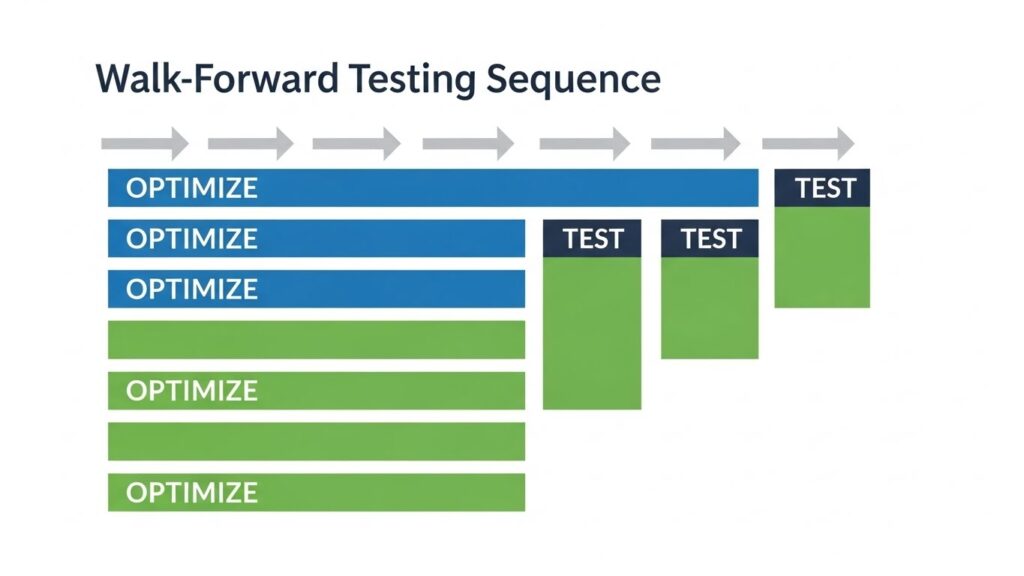
Walk-forward analysis is the gold standard for validating optimization, simulating realistic periodic re-optimization you’d perform in live trading.
How Walk-Forward Works
Divide historical data into segments (e.g., 6-month periods)
Optimize on segment 1, test on segment 2
Optimize on segment 2, test on segment 3
Continue through all segments
Analyze combined results across all forward periods
This simulates what would happen if you re-optimized quarterly using the most recent data, then traded the next quarter with those settings.
Interpreting Walk-Forward Results
Strong systems show:
Positive results in most forward periods (not all—some losses are normal)
Forward performance similar to in-sample optimization performance
Relatively stable optimal parameters across optimization windows
Red flags include:
Forward period performance dramatically worse than optimization periods
Optimal parameters changing wildly between optimization windows
Most forward periods losing money even though optimization periods profit
Walk-Forward Efficiency
Compare total walk-forward profit to total in-sample profit. If walk-forward achieves 60-80% of in-sample results, that’s excellent. Under 40% suggests severe over-fitting.
Validation Techniques
Beyond walk-forward analysis, several validation methods confirm optimization robustness.
Out-of-Sample Testing
Reserve a portion of historical data (typically 20-30%) that you never optimize on. After optimization, test on this completely unseen data.
If optimization period shows 45% annual return but out-of-sample shows 12% annual return, you’ve likely over-optimized. Closer performance between periods indicates more robust optimization.
Monte Carlo Analysis
Randomize the order of historical trades to see if the original sequence happened to be fortunate. Tools like StrategyQuant perform Monte Carlo analysis, running thousands of simulations with shuffled trade sequences.
If 90% of simulations show losses while the original sequence profited, your results are likely luck. If 70%+ simulations remain profitable, results are more robust.
Parameter Sensitivity Analysis
Test performance with parameters slightly varied from optimized values. If changing an optimized value from 19 to 18 or 20 dramatically alters results, that parameter is fragile and likely over-fitted.
Robust optimization produces parameter “sweet spots”—ranges around optimized values that all perform acceptably.
Different Market Condition Testing
Test optimized parameters across different market phases:
Trending periods vs. ranging periods
High volatility vs. low volatility
Bull markets vs. bear markets
Systems that only work in specific conditions are less robust than those performing reasonably across varying environments.
Common Mistakes When Optimizing Expert Advisor Settings
Most traders make the same errors when optimizing expert advisor settings, and recognizing them early prevents wasted time and poor live results.
Avoid these errors that plague EA optimization efforts.
Mistake 1: Optimizing on Too Short Period
Optimizing on three months of data produces results highly specific to that brief period. Use minimum one year, ideally two to three years, spanning different market conditions.
Mistake 2: Testing Too Many Parameters
Optimizing ten parameters simultaneously creates millions of combinations. More parameters increase over-fitting risk and computational requirements dramatically.
Limit optimization to 2-4 most important parameters. Fix others at sensible default values.
Mistake 3: Using Unrealistic Spread/Commission Settings
Optimizing with zero spread or commission produces unrealistic results. Use your broker’s actual costs or slightly conservative estimates to ensure live trading matches optimization conditions.
Mistake 4: Ignoring Drawdown
Chasing maximum profit without considering drawdown produces risky parameters. A 100% return with 80% maximum drawdown is worse than 40% return with 20% drawdown for most traders.
Optimize for risk-adjusted metrics (Sharpe ratio, Profit Factor) rather than raw profit.
Mistake 5: No Validation
Accepting the top optimization result without out-of-sample testing, walk-forward analysis, or parameter sensitivity checks virtually guarantees live trading disappointment.
Mistake 6: Assuming Optimization = Live Performance
Even properly optimized parameters tested thoroughly on out-of-sample data won’t exactly replicate historical results in live trading. Execution costs, slippage, and randomness ensure differences.
Expect live performance to be somewhat worse than optimization results even with robust methodology.
Instead of maximizing single metric, optimize for multiple objectives simultaneously:
Maximize returns while minimizing drawdown
Maximize profit factor while maintaining win rate above threshold
Maximize returns while limiting maximum consecutive losses
This produces parameter sets balanced across multiple goals rather than extreme on one dimension.
Adaptive Parameter Optimization
Some EAs recalculate optimal parameters periodically during operation, adapting to changing markets. Implementation requires careful design to avoid continuous over-fitting.
Machine Learning for Optimization
Advanced approaches use machine learning algorithms to discover optimal parameters or even to adapt trading rules dynamically based on market conditions.
Rather than selecting single optimal parameter set, run multiple parameter combinations simultaneously, combining their signals or averaging their positions. This increases robustness by not depending on any single optimization result.
After Optimization: Deployment Best Practices
Optimizing expert advisor settings does not end at the Strategy Tester — validated parameters must still be monitored closely after deployment.
Optimization doesn’t end when you find good parameters. Proper deployment determines success.
Demo Testing with Optimized Parameters
Run optimized EA on demo account for minimum one month before live deployment. This confirms:
Parameters work with your specific broker
Real-time execution matches backtest expectations
No technical issues exist with the optimized configuration
Small Live Account Testing
Deploy on small live account with micro lots before committing significant capital. Even demo-tested optimization can surprise when real money is involved.
Regular Re-Optimization
Markets evolve, making previously optimal parameters less effective. Schedule periodic re-optimization:
Monthly for short-term strategies
Quarterly for medium-term systems
Semi-annually for longer-term approaches
However, don’t re-optimize after every losing trade or bad week. Allow sufficient time for statistical significance.
Parameter Drift Monitoring
Track whether optimal parameters change significantly over time. If monthly re-optimization produces wildly different values each time, your strategy might be unstable or market conditions unsuitable.
Set thresholds for when to stop trading and re-evaluate:
Drawdown exceeding optimization period maximum by 20%
Three consecutive losing months
Sharpe ratio dropping below acceptable level
Win rate declining substantially below optimization period
Documentation
Maintain detailed records:
Optimization dates and periods used
Parameter values selected and why
Validation results (out-of-sample, walk-forward)
Deployment date and initial performance
Re-optimization schedule and results
This documentation helps you understand what works, what doesn’t, and why.
For understanding how optimized EAs fit into broader automated trading approaches, see our automated forex trading guide.
Traders optimizing expert advisor settings should ensure their strategies comply with regulatory standards; US-based traders can review guidelines from the CFTC and NFA, while international traders can refer to the FCA. The official MQL4 documentation provides technical reference for all EA parameter functions.
Final Thoughts on EA Optimization
Done correctly, optimizing expert advisor settings is what separates a profitable automated strategy from one that only works on paper.
Optimizing Expert Advisor settings is powerful but dangerous. Properly executed, it tunes EAs to market characteristics and improves performance significantly. Carelessly performed, it creates beautiful backtests that fail immediately in live trading, costing substantial capital while providing false confidence.
The key to successful optimization is balancing the search for improved performance against the constant risk of over-fitting. This requires robust methodology: adequate data periods, out-of-sample validation, walk-forward analysis, parameter sensitivity testing, and realistic expectations about optimization’s limitations.
Remember that optimization cannot transform a fundamentally flawed strategy into a winner. It can only improve already sound approaches. If optimization dramatically changes EA performance, you’re probably over-fitting rather than improving.
Approach optimization as fine-tuning, not magic. A 20% improvement through careful optimization is realistic and valuable. Claims of 200% improvement suggest over-fitting or the original parameters were terrible.
Most importantly, understand that no amount of optimization eliminates market risk or guarantees profits. Even perfectly optimized systems face losing periods, drawdowns, and the possibility that market conditions will shift beyond their effective range. Optimization is a tool, not a solution.
For understanding different EA types and which benefit most from optimization, see our EA types guide.